This chapter describes and explains the objects available in the application and their parameters.
Content
Parameter Machine
Parameter Buffer
Parameter Text item

|
Note:
The objects Source and Sink do not have parameters.
|
Parameter Machine
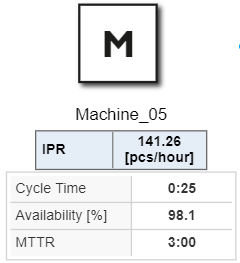
Figure 1 - Parameter Maschine
|
Parameter
|
Necessary
|
Description
|
Cycle time
|
x
|
Time for producing a single unit
|
Availability [%]*
|
x
|
Percentage of time, where the machine is not in failure
|
MTTR
|
x
|
Average time needed to repair this machine
|
MTBF*
|
x
|
Average time between successive failures
|
*available when activated in project settings (local) section "1.8 Failure mode"
|
Parameter Buffer
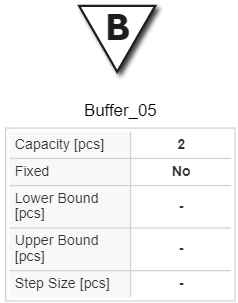
Figure 2 - Parameter Buffer
|
Parameter
|
Necessary
|
Description
|
Capacity [pcs]
|
x
|
Amount of units (pieces) this buffer can hold before it’s full.
|
Fixed
|
|
(only relevant for optimization): If fixed, this buffer can’t be changed during buffer space optimization.
|
Lower Bound [pcs]
|
|
(only relevant for optimization): Lowest capacity to consider during optimization
|
Upper Bound [pcs]
|
|
(only relevant for optimization): Highest capacity to consider during optimization.
|
Step size [pcs]
|
|
(only relevant for optimization): Only capacities divisible by the step-size are considered during optimization.
|
|
Parameter Text item

Figure 3 - Parameter Text item
|
Parameter
|
Necessary
|
Description
|
Text
|
x
|
Text that is shown
|
Font color
|
|
Color of the text shown
|
Background color
|
|
Background color of the textbox
|
Font size
|
x
|
Font size of the text shown
|
Font style
|
|
Font style bold / not bold
|
Alignment
|
|
Alignment of the text shown
|
Border color
|
|
Color of the border of the textbox
|
Border thickness
|
|
Thickness of the border of the textbox
|
External link
|
|
Text field for an external link. If a valid link is entered, it can be accessed by clicking on the text field.
|
|
© SimPlan AG - Hanau District Court, Commercial Register (Part B) 6845 - info@simplan.de - www.simplan.de/en